
Free for Windows 10 & 11
Every frame your PC already has, unlocked.
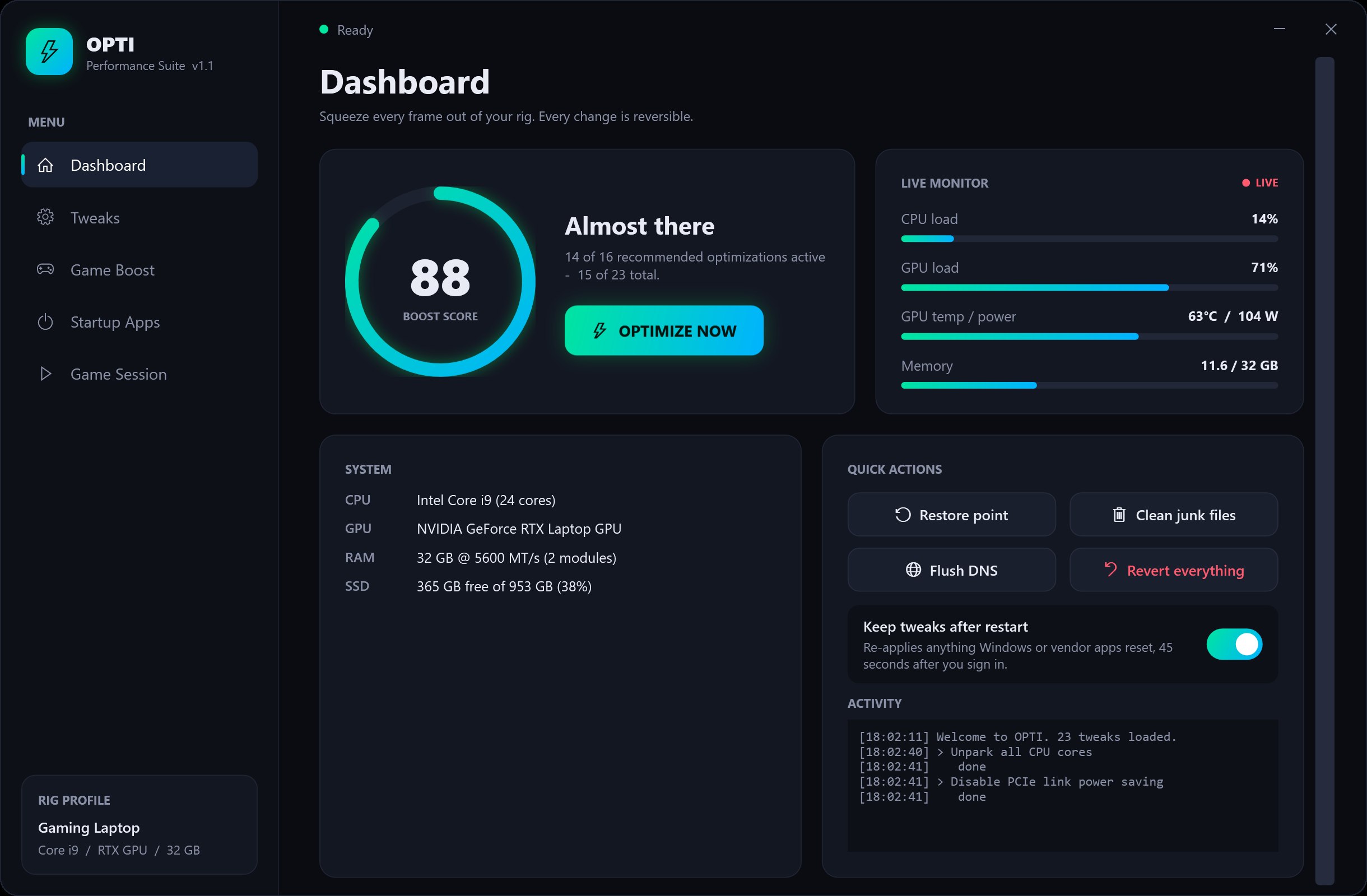
OPTI is a one-click Windows optimizer for gamers. It tunes the power plan, CPU scheduler, GPU, network and input settings that Windows ships with conservative defaults. Every change is backed up and reverses with one switch.
38tweaks across 6 areas
25in the one-click profile
1switch to undo any change
0accounts, ads or tracking
How it works
Three minutes from download to tuned.
OPTI changes Windows settings, never your games. No drivers, no overclocking, nothing running in the background while you play.
Step 1
Run OPTI.exe
Extract the zip and open OPTI. Windows asks for admin rights because these are system settings.
Step 2
Press Optimize now
OPTI saves a System Restore point, backs up each original value, then applies the 25 recommended tweaks.
Step 3
Restart and play
A few tweaks take effect after a restart. Turn on "Keep tweaks after restart" so updates and vendor apps can't undo them.
Under the hood
Every tweak, and the exact setting it changes.
No mystery boosts. Each switch maps to a documented Windows setting, shown here in the same terms Windows uses.
SAFE no downside on a gaming PC
ADVANCED helps some setups, off by default
TRADEOFF asks before applying
RESTART takes effect after reboot
More than switches
Built for how you actually play.
Game Boost
Pin each game to your dedicated GPU and start it at High CPU priority, every launch. Laptops stop running games on the integrated chip by mistake.
- Auto-detects Riot, Epic and Steam games
- Remove a game to undo both settings
Startup Apps
See every app that launches when Windows starts and turn them off with a switch. Faster boots and fewer launchers fighting your game for CPU time.
- Same mechanism as Task Manager
- Turn any app back on at any time
Live monitor
CPU load, GPU load, GPU temperature and power draw, and memory use, updated every two seconds on the dashboard.
- GPU stats on NVIDIA cards
- Warns about battery power, full SSDs and old drivers
Keep tweaks after restart
Windows updates and laptop vendor apps like Armoury Crate quietly reset power settings. OPTI checks 45 seconds after you sign in and re-applies only what was reset.
- Optional, off until you turn it on
- Runs once, then exits
Game Session
Close the background apps that keep drawing on your CPU and GPU while you play: live wallpapers, desktop widgets, screen-capture lighting, sync clients. Reopen them all in one click when you are done.
- Shows how much RAM each app is using
- Only ever closes apps from its own list
Refresh-rate check
A 240 Hz screen left at 60 Hz throws away most of what your GPU renders. OPTI lists every display's current and maximum refresh rate and fixes it with one switch.
- Works with multiple monitors
- Restores the old rate if you turn it off
Safety
Reversible by design.
An optimizer you can't undo is a gamble. OPTI records the original value of every setting before touching it, so turning a switch off puts back exactly what was there.
Per-setting backup
Original values are saved to %LOCALAPPDATA%\OPTI\backup.json before any change.
System Restore point
Created automatically before the first one-click optimization.
Readable source
OPTI is a PowerShell app. The full script sits in C:\Program Files\OPTI\Opti.ps1 for anyone to read.
Security stays on
The one setting that lowers protection, Memory Integrity, is off by default and asks before it applies.
FAQ
Questions before you install.
Windows says "Windows protected your PC". Is that normal?
Yes. SmartScreen shows this for new apps that aren't code-signed yet. Click "More info", then "Run anyway". You can check the file against the SHA-256 hash in the download section.
How many more FPS will I get?
It depends on your hardware and games, so OPTI doesn't promise a number. The biggest gains are usually steadier frame times and fewer stutters, especially on laptops whose default power settings hold the CPU and GPU back.
Will it get me banned by anti-cheat?
OPTI only changes Windows settings: power, scheduler, network and registry options. It never touches game files, game memory or anti-cheat software.
Does it work on AMD and Intel systems?
Yes. The tweaks are Windows settings and work on Intel and AMD processors with any graphics card. Live GPU temperature and power readings need an NVIDIA card.
My laptop has Armoury Crate (or a similar vendor app). Any conflicts?
OPTI detects ASUS Armoury Crate and works alongside it: keep Armoury Crate on Turbo, and OPTI sets Windows' Best performance mode instead of creating its own power plan, which Armoury Crate would delete.
How do I uninstall it?
On the Dashboard, press Revert everything and turn off "Keep tweaks after restart". Then delete the folders C:\Program Files\OPTI and %LOCALAPPDATA%\OPTI.
Download
Get OPTI 1.1.0
Free. No installer, no account, no ads.
- File
- OPTI-1.1.0-win-x64.zip (48 KB)
- Requires
- Windows 10 or 11, 64-bit, admin rights
- Contains
- OPTI.exe, README.txt
- SHA-256
6E96D86699E3D6C3E88293D424FDF5FF05337B45FC4BB0B3BA172E9A918FB6CB
Download for Windows
Free download, 48 KB. SHA-256 checksum